Know what brings them in. See what happens next.
Follow the source of an enquiry, see how clients use your documents, and review the campaigns bringing work to your business.
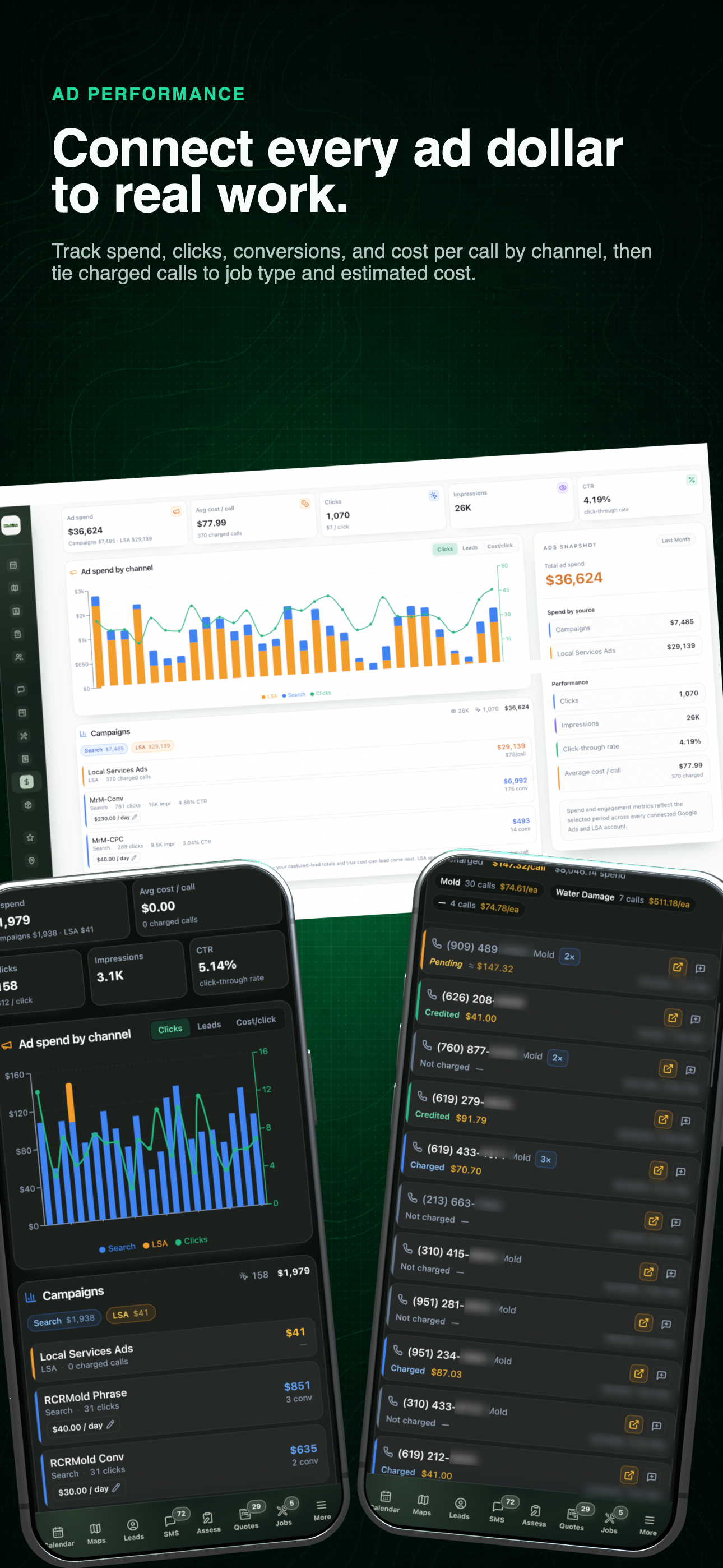
Acquisition performance overview
Campaign performance, calls, and the activity behind each visit.
From first visit to follow-up
A better starting point for the next decision.
See where an enquiry came from, what a client opened, and how your advertising performed. Open the details when it’s time to follow up or adjust a campaign.
- 01
Keep available source context
When source, medium, campaign, term, content, referrer, and landing-page data are captured, keep them on the submission and linked lead for later review.
- 02
Read the document history
Review saved versions and client activity with timestamps plus device and approximate location context when those values are available.
- 03
Review the operating period
Use the selected date range to compare income, expenses, net profit, outstanding revenue, advertising spend, and performance over time.
- 04
Compare local visibility
Run rank scans for the keywords and service areas you care about, then compare the resulting grid with earlier scans and named competitors.
01 / Incoming leads
Know what brought the enquiry in.
Open a website submission to see the service requested, the client’s message, and the source or campaign captured with the visit. Keep that context as the enquiry becomes a lead.
Use the left and right arrow keys to change screenshots. On a touch screen, swipe horizontally. Activate a screenshot to open its expanded view.
A submission arrives with connected records, acquisition context, preferred timing, service type, and the customer’s stated need.
1 / 1
Swipe to view
1 / 1
Website sessions
See the visit from their side.
Open a session to see the page as it appeared on the visitor’s phone. Follow their scrolling and touch gestures, change playback speed, or skip idle time to get to the useful moments.
Start with where they came from.
The session list brings the source, device, location, pages, and duration together. Choose a visit from Google Ads or organic search, then open the recording to understand what happened on the page.
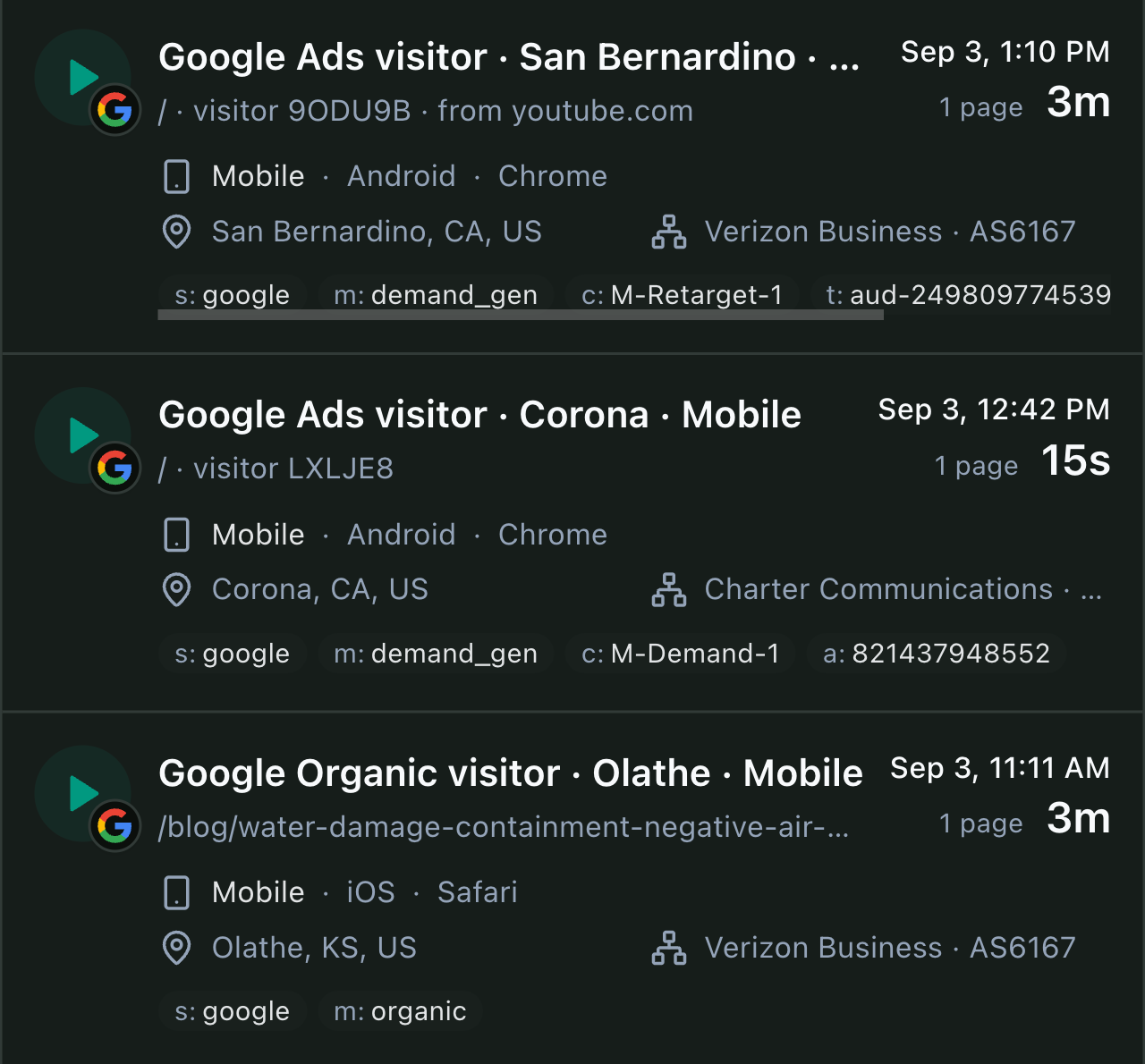
Choose a visit to inspect
Anonymous visitor rows from the actual session list.
Play the recording to see the scrolling and gestures in motion. Use the player’s fullscreen control for a closer look.
Document intelligence
Know what happened after you pressed send.
Quotes and invoices keep a clear activity trail. Follow up with context instead of guessing whether the client received, opened, or returned to a document.
See the signal
Views, unique visitors, downloads, and prints are visible at a glance.
Follow the history
Know which version was opened and when the client came back.
Keep the audit trail
Device and location details stay attached to the document activity.
Real product view. Sensitive client details have been obscured.
Recorded sessions
See how they read it.
Open a recorded session to follow the client’s scrolling, taps, and next page. In this real visit, the client reviewed a paid remediation invoice, then opened the assessment report.
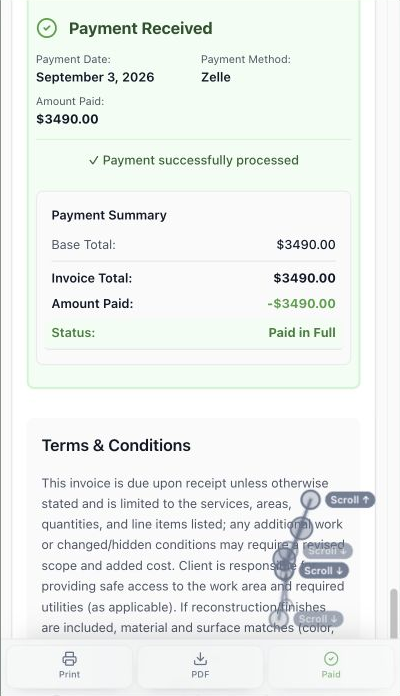
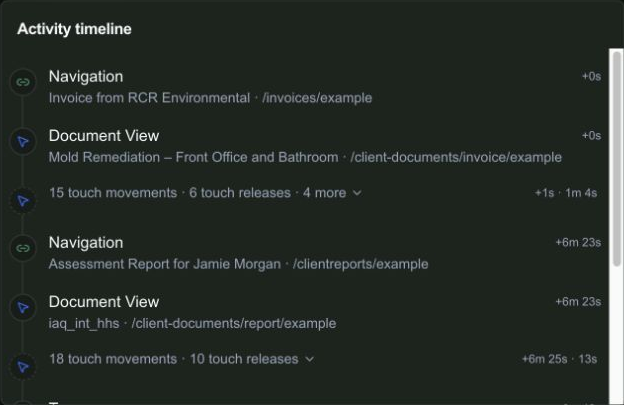
From invoice to report
Actual session activity. Client name and document links replaced for this preview.
At 6:23, the timeline records the move from invoice to report. That gives the next conversation a starting point beyond “Did you get my email?”
02 / Campaigns
Follow ad spend into the calls behind it.
Choose a date range, compare campaigns, and open the calls behind the spend. See the requested service and whether each call was charged or credited.
- 01
Start with the selected period
Review available spend, calls, impressions, conversion rate, and channel mix with the date range still visible.
- 02
Open the campaign detail
Move from the blended totals into individual campaign and channel results before deciding what is actually changing.
- 03
Inspect the calls behind attribution
Where the source data exists, compare call status, job type, and estimated value instead of treating every attributed call as equal.
Use the left and right arrow keys to change screenshots. On a touch screen, swipe horizontally. Activate a screenshot to open its expanded view.
Read the period summary, channel mix, and individual campaign results in the same view.
1 / 2
Scroll through the workflow
2 views
Mobile workflow
01 / 02
Mobile workflow
02 / 02
Tap any view to expand it, then use the controls or swipe between the full-screen screens.
Local rank tracking
See where clients can find you.
Check your position across the service area, compare nearby competitors, and save the scan to track changes over time.
- 01
Choose the term and service area
Run the grid for the keyword, radius, density, and market that matter to the business rather than relying on one blended visibility score.
- 02
Read the completed field points
Compare average rank, top-three share of voice, top-ten coverage, and the individual map positions that make those percentages real.
- 03
Save the comparison
Use the report to document the grid, named competitors, and current result before comparing it with a later scan.
Use the left and right arrow keys to change screenshots. On a touch screen, swipe horizontally. Activate a screenshot to open its expanded view.
Keep each saved scan’s terms, market, grid coverage, radius, and date visible before opening the map.
1 / 3
Scroll through the workflow
3 views
Mobile workflow
01 / 03
Mobile workflow
02 / 03
Report or document
03 / 03
Tap any view to expand it, then use the controls or swipe between the full-screen screens.
Bring the business result into view.
Compare income, expenses, and profit for the same period in Financials. Review the transactions behind the totals when you need the detail.
Explore financials →Let’s walk through a job.
Tell us how you work today. We’ll walk through the calls, fieldwork, and reports that matter to your team.
0130-minute personalized walkthrough
02See pricing for your team size
03No obligations or pressure